
I use separate Chrome profiles for personal and work browsing. Chrome supports that, but its desktop integration didn't match the way I wanted to use profiles from a keyboard-first Linux desktop.
The problem wasn't that Chrome lacked a profile picker. The problem was that "open Chrome" had become an underspecified action. Sometimes I meant personal. Sometimes I meant work. Sometimes I clicked a link from a focused Niri workspace that already had the right browser context, and I wanted the link to join that workspace instead of pulling me somewhere else.
So I stopped trying to make Chrome's generic launcher carry all of that policy. I made the actions explicit:
chrome-personal [URL...]
chrome-work [URL...]
chrome-pick [URL...]
Then I made a small URL router, nignite, and put it on both URL entry paths I use: XDG desktop handling and kitty URL clicks. The real implementation lives in my public NixOS config: modules/home/desktop/nignite.nix, with the terminal URL path configured in modules/home/kitty.nix.
The result is a split between two different entry points. Launcher search shows the human choices. URL handling uses the router. Chrome still owns Chrome state.
What was wrong
There were three annoyances tangled together.
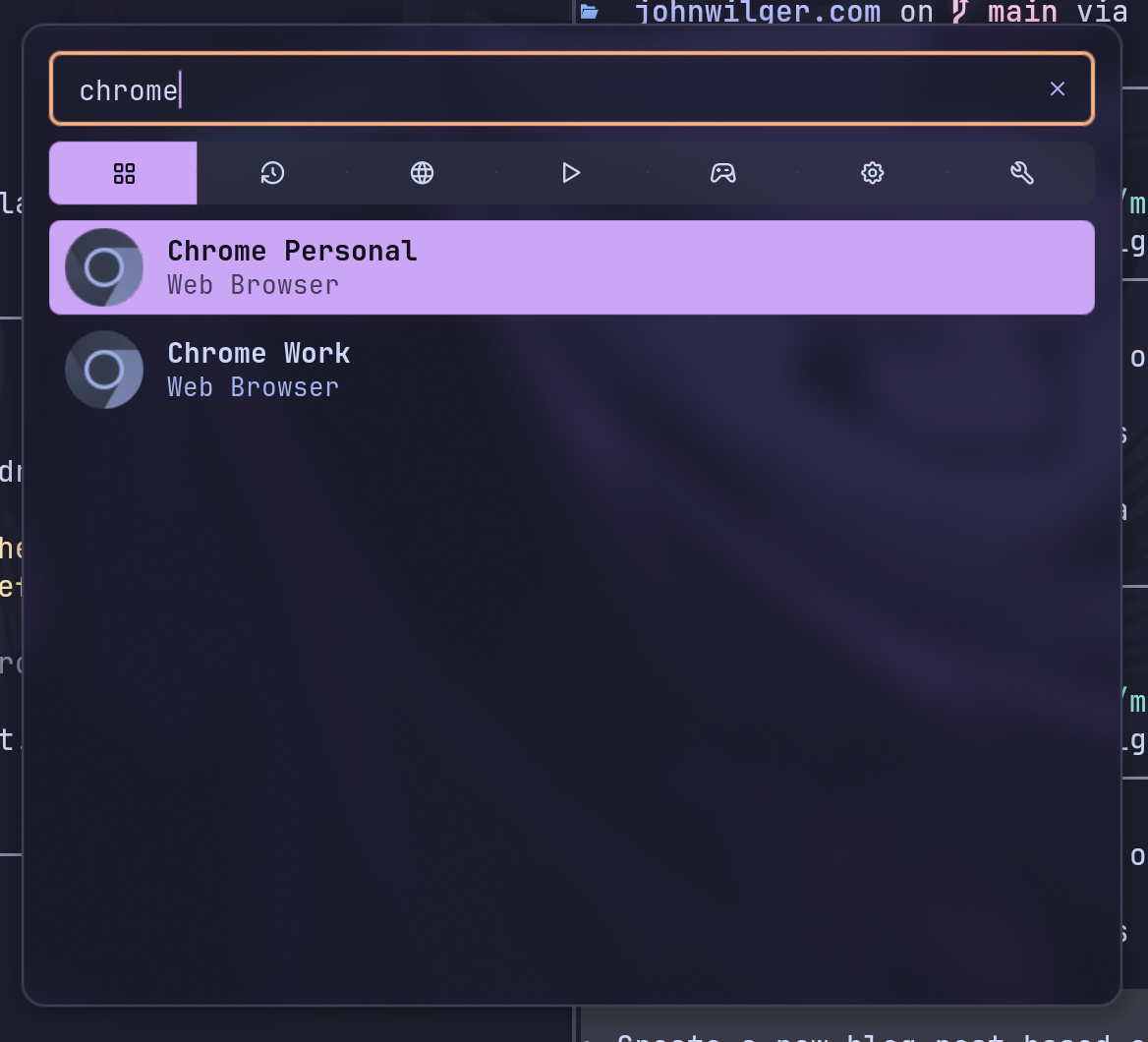
First, launcher search was ambiguous. Searching for Chrome could surface the generic Google Chrome desktop entry, but that entry didn't encode the decision I usually needed to make: personal profile or work profile.
Second, external links didn't always land in the context I expected. With Niri, workspace locality is part of how I think about work. If workspace 3 already has a browser window for a task, a link clicked from that workspace should usually join that browser window. Jumping to an existing Chrome window on another workspace breaks that flow.
Third, Chrome's profile picker is mutable application state. I didn't want my Nix configuration to manage Chrome's Local State file just to influence the profile behind the generic launcher. Chrome owns that file. Declarative desktop configuration shouldn't have to pretend otherwise.
That changed the framing. The question wasn't "how do I configure Chrome's picker?" It was "what browser actions do I actually want available from the desktop?"
The small commands
The profile-specific launchers don't inspect Chrome state or talk to the compositor. In Home Manager, they're writeShellApplication derivations that add exactly one Chrome flag:
chromePersonal = pkgs.writeShellApplication {
  name = "chrome-personal";
  runtimeInputs = [ browserPackage ];
  text = ''
    exec ${browserExe} --profile-directory=Default "$@"
  '';
};

chromeWork = pkgs.writeShellApplication {
  name = "chrome-work";
  runtimeInputs = [ browserPackage ];
  text = ''
    exec ${browserExe} --profile-directory="Profile 4" "$@"
  '';
};
Those profile directory names come from Chrome's local profile metadata. In my setup, Default is personal and Profile 4 is work. That's not a portable truth about Chrome; it's a local fact that belongs in my machine configuration.
The picker is just as small:
chromePick = pkgs.writeShellApplication {
  name = "chrome-pick";
  runtimeInputs = [
    chromePersonal
    chromeWork
    pkgs.fuzzel
  ];
  text = ''
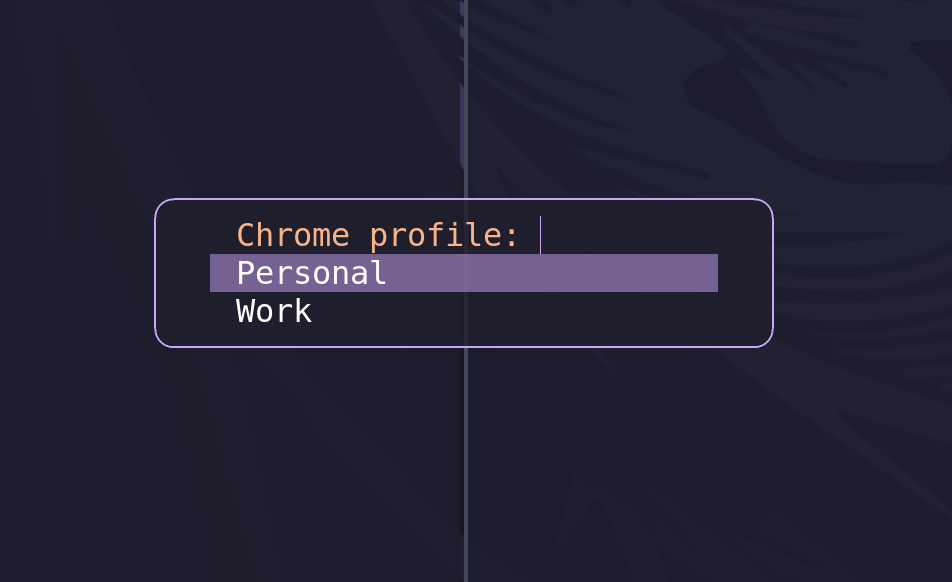
    choice="$(printf 'Personal\nWork\n' | fuzzel --dmenu --prompt='Chrome profile: ' --lines=2 --width=24)" || exit 0

    case "$choice" in
      Personal)
        exec chrome-personal --new-window "$@"
        ;;
      Work)
        exec chrome-work --new-window "$@"
        ;;
      *)
        exit 0
        ;;
    esac
  '';
};
The --new-window is doing real work. When the picker appears, it's because the router didn't find a Chrome window on the current workspace. Selecting a profile should create a browser window in the current workspace, not let Chrome reuse a session somewhere else.
Routing links by workspace
nignite is the default handler for URLs. Its policy is:
- Ask Niri which workspace is focused.
- Look for a Chrome or Chromium window on that workspace.
- If one exists, focus it and open the URL as a new tab.
- If none exists, ask which profile to use.
- If the chooser is canceled, do nothing.
The focused workspace lookup uses Niri's JSON IPC:
focused_workspace_id="$(
  niri msg -j focused-window 2>/dev/null \
    | jq -er '.workspace_id // empty' 2>/dev/null \
    || niri msg -j workspaces 2>/dev/null \
    | jq -er '.[] | select(.is_focused == true) | .id' 2>/dev/null \
    || true
)"
The fallback to workspaces is there because a workspace can be focused even when no window is focused. That's an easy case to miss if the script only asks for the focused window.
Once the router has a workspace ID, it searches Niri's window list:
chrome_window_id="$(
  niri msg -j windows 2>/dev/null \
    | jq -er --argjson workspace_id "$focused_workspace_id" '
        [
          .[]
          | select(.workspace_id == $workspace_id)
          | select(
              ((.app_id // "") | test("chrome|chromium"; "i"))
              or ((.title // "") | test("chrome|chromium"; "i"))
            )
        ][0].id
      ' 2>/dev/null \
    || true
)"
If it finds a browser window, it focuses that window before handing Chrome the URL:
if [ -n "$chrome_window_id" ]; then
  niri msg action focus-window --id "$chrome_window_id" >/dev/null 2>&1 || true

  if [ "$#" -eq 0 ]; then
    exit 0
  fi

  exec ${browserExe} --new-tab "$@"
fi

exec chrome-pick "$@"
This isn't trying to infer whether the current workspace is "personal" or "work." That would be a bigger claim than the desktop can support. It only says: if a browser context already exists on this workspace, reuse it. Otherwise ask me.
Desktop entries and terminal clicks
The visible launchers are normal XDG desktop entries:
xdg.desktopEntries = {
  chrome-personal = {
    name = "Chrome Personal";
    exec = "${lib.getExe chromePersonal} %U";
    icon = "google-chrome";
    genericName = "Web Browser";
    noDisplay = false;
    terminal = false;
  };

  chrome-work = {
    name = "Chrome Work";
    exec = "${lib.getExe chromeWork} %U";
    icon = "google-chrome";
    genericName = "Web Browser";
    noDisplay = false;
    terminal = false;
  };
};
The generic Chrome entry is still accounted for, but hidden:
google-chrome = {
  name = "Google Chrome";
  noDisplay = true;
};
The router is also hidden because I don't launch it directly:
nignite = {
  name = "Chrome Workspace Router";
  exec = "${lib.getExe nignite} %U";
  icon = "google-chrome";
  noDisplay = true;
  terminal = false;
};
Then MIME defaults point browser-ish things at nignite.desktop:
xdg.mimeApps.defaultApplications = {
  "text/html" = "nignite.desktop";
  "x-scheme-handler/about" = "nignite.desktop";
  "x-scheme-handler/http" = "nignite.desktop";
  "x-scheme-handler/https" = "nignite.desktop";
  "x-scheme-handler/unknown" = "nignite.desktop";
};
That covers the normal desktop path, but kitty URL clicks needed one more step. Kitty's default clicked-URL handler is xdg-open. Even with MIME defaults pointing at nignite.desktop, that extra xdg-open and desktop-launch layer could make the active-workspace decision happen after focus had already shifted. In practice, shift-clicking a URL from a terminal could still reuse Chrome somewhere else instead of prompting from the terminal workspace.
The fix was to make kitty call the router directly:
programs.kitty.settings = {
  open_url_with = "nignite";
};
That keeps the terminal click on the same path as every other routed URL, but without an extra launcher layer in front of the workspace check.
That split is the design:
- Noctalia shows
Chrome PersonalandChrome Work. - External links use
nignite.desktop. - Kitty URL clicks call
nignitedirectly. - The generic
Google Chromeentry doesn't compete in launcher search.
The desktop entries become the API between the shell, launcher, MIME database, and browser commands. Once I looked at it that way, the setup got much simpler.
I verified the live behavior where it actually matters: Noctalia offered the two profile-specific entries, Fuzzel prompted when the workspace didn't already have Chrome, kitty's parsed config contained open_url_with nignite, and links reused an existing Chrome window when one was present on the focused workspace.
The useful boundary
The part I like most is the ownership boundary.
Chrome owns profile state. Home Manager owns commands, desktop entries, MIME defaults, and the kitty URL handler setting. Niri owns workspace information. Fuzzel owns the tiny chooser. Noctalia owns launcher presentation.
I don't need Home Manager to edit Chrome's preferences. I don't need Chrome to understand my workspace policy. I don't need the launcher to infer intent from one generic browser entry.
Small commands with explicit names were enough:
chrome-personal
chrome-work
nignite https://example.com
That gives me the desktop behavior I wanted: search for the profile I mean, click links normally, and keep browser actions local to the workspace whenever there's already a local browser context.
It's not a framework. It's just the desktop policy I kept wishing the generic launcher had, written down as commands.